Anchors never invented
Every anchor is verified verbatim against your text. If the phrase is not in the post, the link is rejected rather than forced.
Free on WordPress.org · Pro from $29/yr
Autolinker is the WordPress plugin that reads every post, finds the most related pages on your site by meaning, and links them with anchor text that already exists in your copy. Your own OpenAI key, no credits, no keyword lists.
Site speed still moves rankings. Image compression is the fastest win: serve WebP, lazy-load below the fold, and let a caching plugin handle the rest. None of it matters if your hosting is slow.
The problem
Linking by hand works for the first fifty posts. After that the oldest ones are forgotten, and they are the ones with the most to give.
A keyword-to-URL list links the same words to the same page in every post, whether it fits the sentence or not. Readers notice.
Some tools write a new sentence to hold the link. Your voice and your claims end up edited by a model you did not ask to edit.
The rule
The model proposes an anchor. The plugin then checks that the exact phrase is already in your post, word for word. If it is not, the link is rejected and the reason goes to the journal. Nothing is forced into your text, and an empty result is never a mystery.
See the real journal| Decision | Anchor | Reason |
|---|---|---|
| placed | "image compression" | confidence 0.88 |
| dropped | "speed optimization guide" | anchor_ |
| dropped | "click depth" | below_ |
| placed | "crawl budget" | confidence 0.84 |
How it works
Each pass is a separate background job. Relevance is decided by embeddings, anchors by a language model, and nothing is ever forced into your text.
Every post becomes a vector with an OpenAI embeddings model, stored locally and refreshed only when the content changes.
Cosine similarity ranks every possible target above your threshold. Relevance comes from meaning, not from matching strings.
A first model pass drops candidates that are topically close but editorially wrong.
A second pass proposes an anchor phrase that already exists, word for word, in your text. No verbatim match, no link.
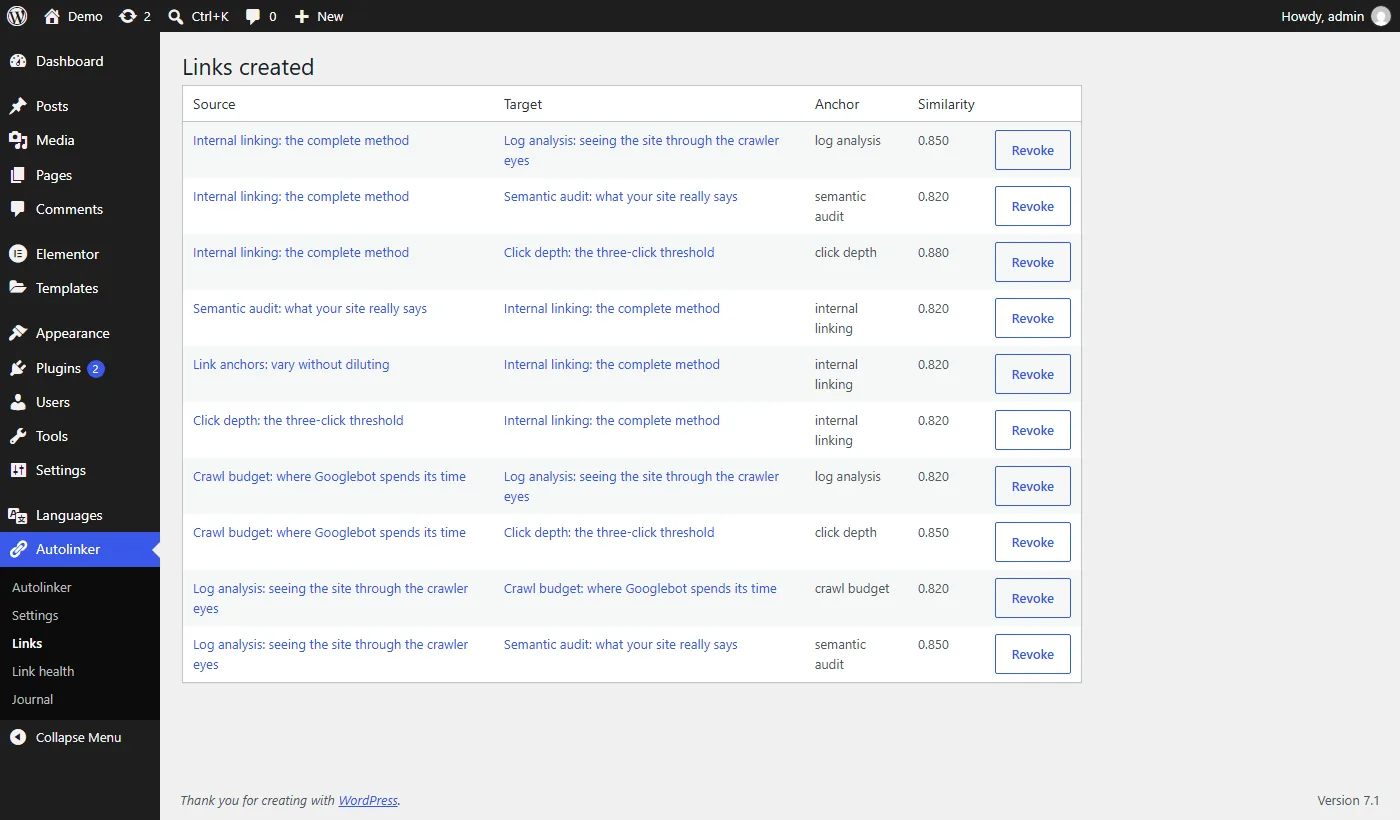
The link is written into the post as real HTML with a marker attribute, tracked in a registry, repairable later.
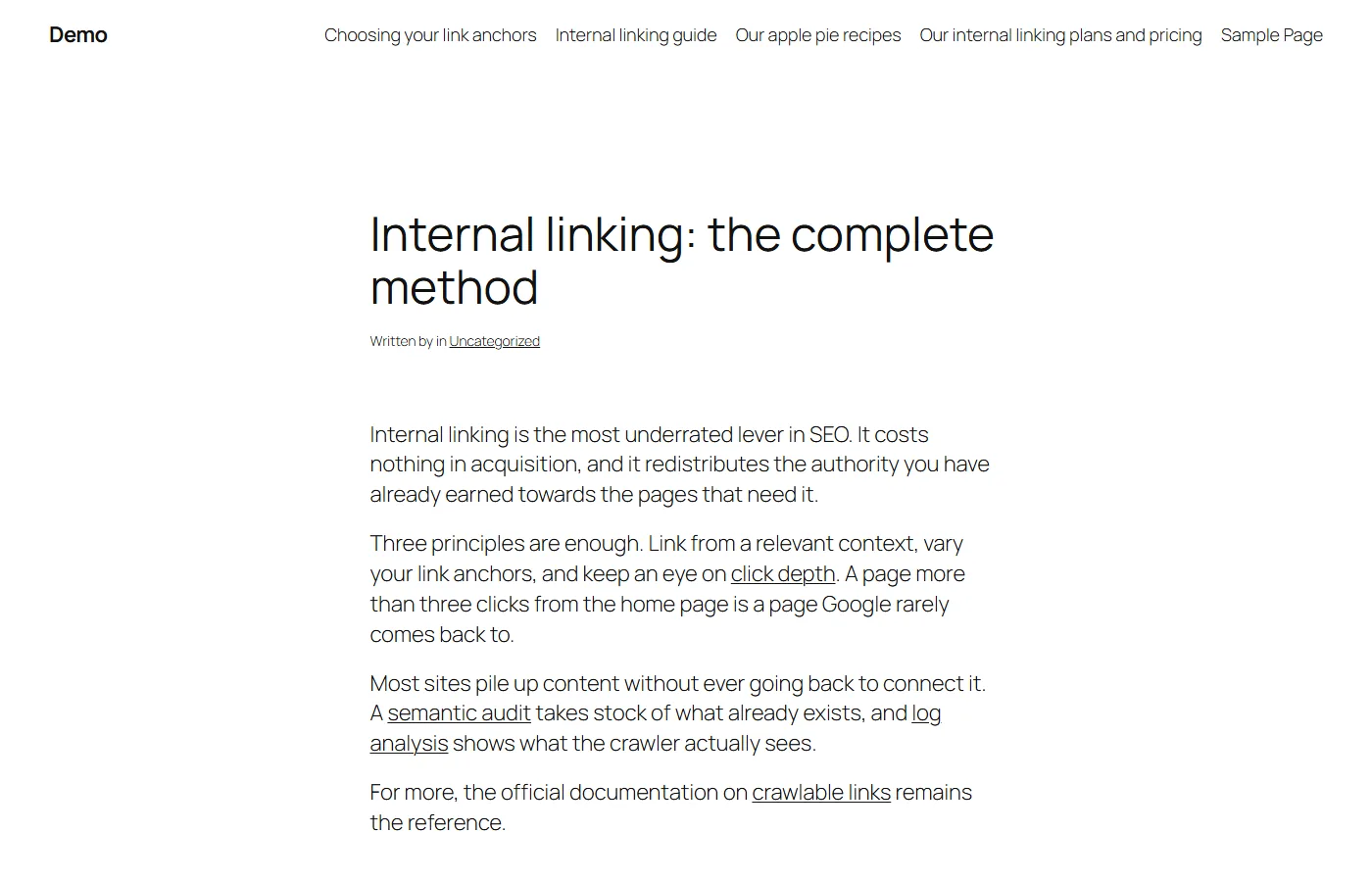
Links are real HTML in your content. They survive exports, feeds and search engines, and they stay if you ever deactivate the plugin.
Why it is different
| Compared on | Keyword-to-URL plugins | AI tools that rewrite | Autolinker |
|---|---|---|---|
| Finds targets by | Keyword plugins: Keywords you list by hand | Rewriting AI tools: A model reading your posts | Autolinker: Meaning: OpenAI embeddings of every post |
| Anchor text | Keyword plugins: Usually the keyword itself, wherever it appears | Rewriting AI tools: Often a new phrase the model writes | Autolinker: A phrase already in your text, verified word for word |
| Your sentences | Keyword plugins: Untouched, but the same words tend to get the same link | Rewriting AI tools: Often rewritten to fit the link | Autolinker: Never rewritten: existing words are wrapped in a link |
| What you pay | Keyword plugins: Usually a paid licence for the full version | Rewriting AI tools: A licence, often with AI credits on top | Autolinker: Free, or Pro from $29 a year, plus OpenAI at cost |
| After uninstall | Keyword plugins: Often added at display time, so they disappear with the plugin | Rewriting AI tools: Depends on the tool | Autolinker: Links stay: plain HTML in your content |
| Rejected links | Keyword plugins: Usually not tracked | Rewriting AI tools: Rarely explained | Autolinker: Every rejection journaled with a reason |
In the box
Every anchor is verified verbatim against your text. If the phrase is not in the post, the link is rejected rather than forced.
A per-post link budget, anchor length bounds, and per-post exclusions: as source, as target, or entirely.
Keep links inside the same category so your topical clusters stay tight.
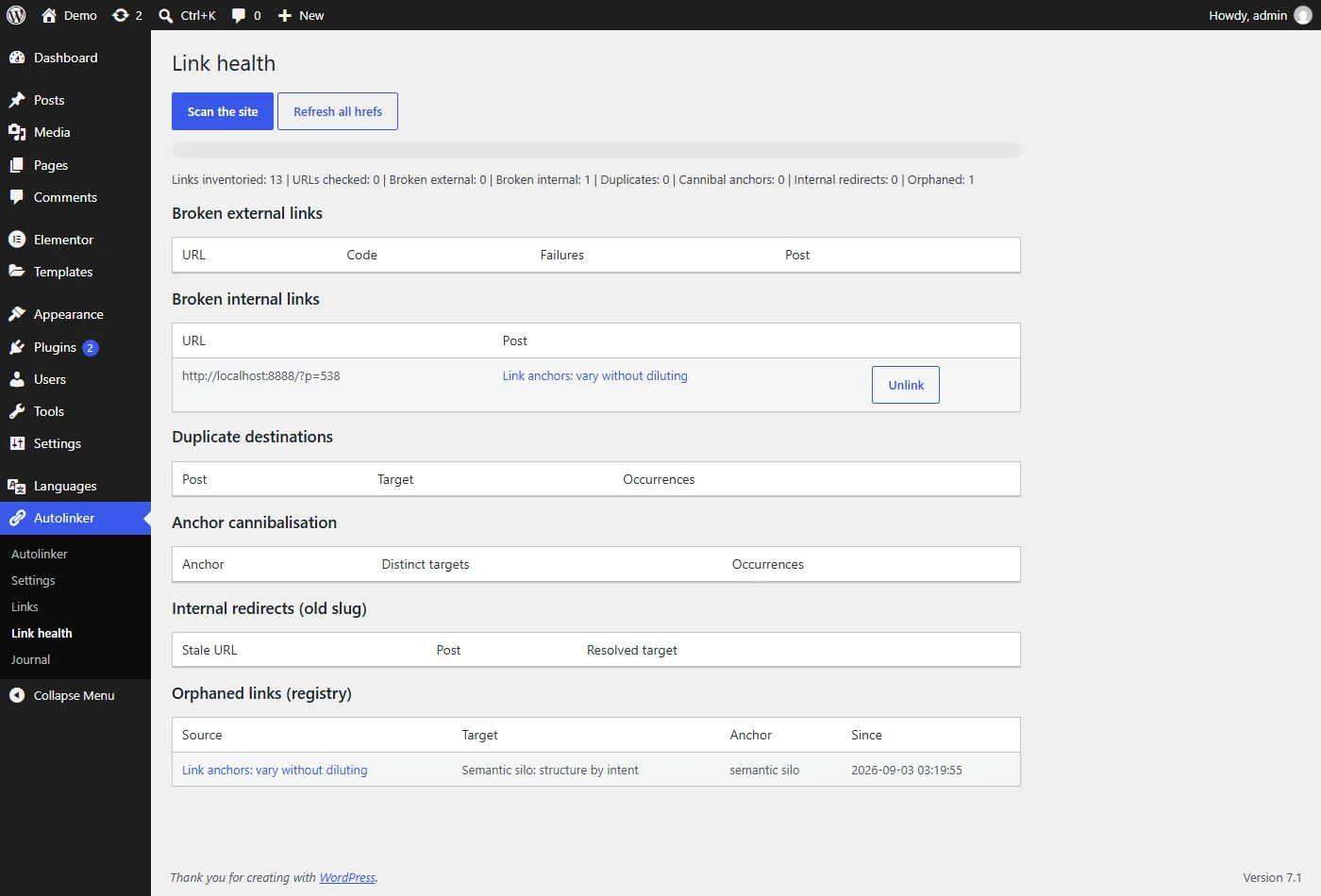
Broken targets are detected on a schedule, orphaned links are flagged, and when a permalink changes the links pointing at it are rewritten.
Elementor text editor widgets are linked, including content stored in Elementor's own data structure, and so are ACF fields. Other widgets are left alone.
WPML and Polylang are detected automatically and links stay inside one language: a French post never links to its English translation. TranslatePress, Weglot and GTranslate sites are handled as single-language, since only the original exists in the database.
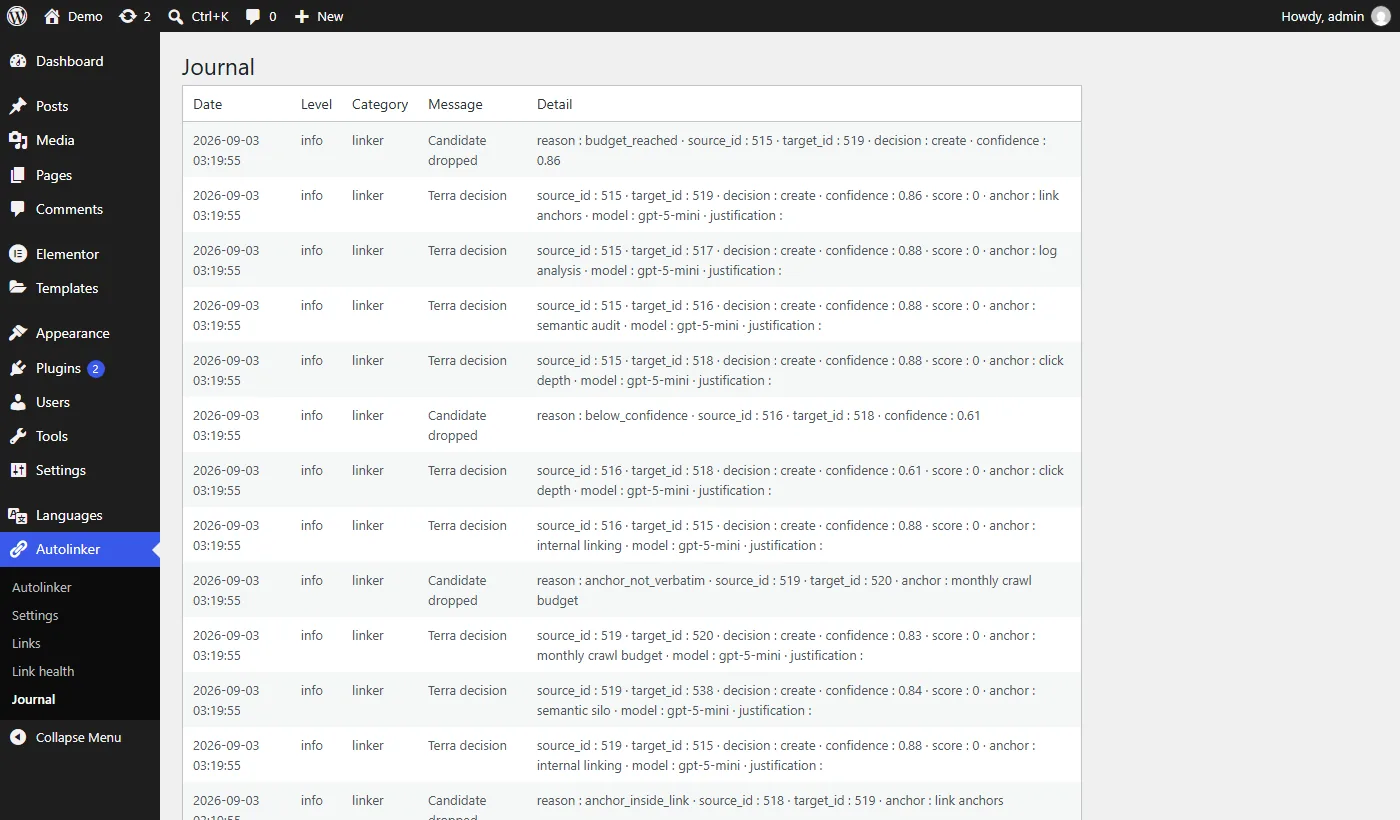
Every link placed and every candidate rejected is logged with a reason. An empty result is never a mystery.
Need economy mode, scheduled passes or priority pages? See Autolinker Pro, from $29 a year.
The real admin
Screenshots from a demo site, produced by the real engine. No mock-ups.
Your content stays yours
Links are written into your content as ordinary HTML. Deactivate the plugin and they stay where they are; only tracking, health checks and repair stop until you reactivate.
Only the text of the posts you process, the titles and excerpts of candidate targets, and the prompts built around them, sent to api.openai.com with your own key. None of your content is sent to us.
Read the privacy policyEvery paid plan, the Founder lifetime deal included, comes with a 14-day money-back guarantee.
Refund policy
Built by Maximilien
I'm Maximilien Labadie. I run SEOPepper and write about search at Web & SEO. I built Autolinker for my own sites: I wanted internal links everywhere without a plugin putting words in my mouth. Every anchor it places is a phrase you already wrote.
Maximilien LabadieWeb & SEOWrite to me
Pricing
$0forever
The complete plugin on unlimited WordPress sites, with no link cap.
Get it on WordPress.org$29a year, 1 site
Economy mode at about half the API cost, scheduled passes, priority pages and a CSV report of your links and orphaned pages.
Compare Pro plans14-day money-back guarantee on every paid plan. Prices in USD, payment handled by Paddle.
FAQ
The full documentation covers install, compatibility and costs. Something else? Ask us directly.
Yes. The plugin has no bundled key and no free tier of its own. You create a key on your own OpenAI account and pay OpenAI for what you use.
It depends on how many posts you process and how long they are. The per-post link budget caps how many placements are attempted, and embeddings are cached, so a post that has not changed is never re-embedded. Autolinker Pro adds an economy mode that batches scans through the OpenAI Batch API, for about half the API cost.
Yes, on purpose. Links are written into the post content as ordinary HTML, with a marker attribute so the plugin can find its own links later. They survive in exports, in feeds and for search engines, and they do not depend on a filter running at display time. Your sentences are not rewritten: the anchor is a phrase that is already there.
The links stay in your content, because they are ordinary HTML. Link tracking, health checks and repair stop until you reactivate.
Yes. Each post has controls to exclude it entirely, to stop it being used as a link source, or to stop it receiving links.
Elementor is supported, including content stored in Elementor's own data structure: text editor widgets are linked, other widgets are left alone. Builders that store their layout as shortcodes, such as Divi, are linked inside their text with the shortcodes untouched. Builders that keep their content outside the post content field, such as SeedProd, are not supported yet, and nothing is written on those pages.
No. The plugin adds nothing to the front end: no meta tag, no canonical, no sitemap, no filter at display time. An SEO plugin counts its links exactly like a link you typed yourself. It also reads the noindex setting of those four, so a page you marked noindex is never chosen as a link target.
Open the journal. Every candidate that was considered and dropped is recorded with a reason: below the similarity threshold, rejected by the filtering pass, or an anchor that did not appear verbatim in the source. The last one is the most common, and it is working as intended: the plugin will not invent an anchor that is not in your text.
They are the first thing Autolinker fixes.
Get it on WordPress.orgFree, no signup, works with your own OpenAI key.